Hey this is Leslie Robinson from Footsteps. I am having a hard time figuring out the new authentication process. I have tried downloading the app on my phone but nothing seems to be working.
PLEASE READ THIS WARNING: This message is intended only for the use of the person(s) ("intended recipient") to whom it is addressed. It may contain information that is privileged and confidential. If you are not the intended recipient, please contact the sender as soon as possible and delete the message without reading it or making a copy. Any dissemination, distribution, copying, or other use of this message or any of its content by any person other than the intended recipient is strictly prohibited. Axxess Data Solutions has taken precautions to screen this message for viruses, but we cannot guarantee that it is virus free nor are we responsible for any damage that may be caused by this message.
This ticket was created via the email parser.
When you login to Microsoft on your computer. Use this website: https://portal.office.com/ you should see a Microsoft prompt for More information or Action required, press Next.
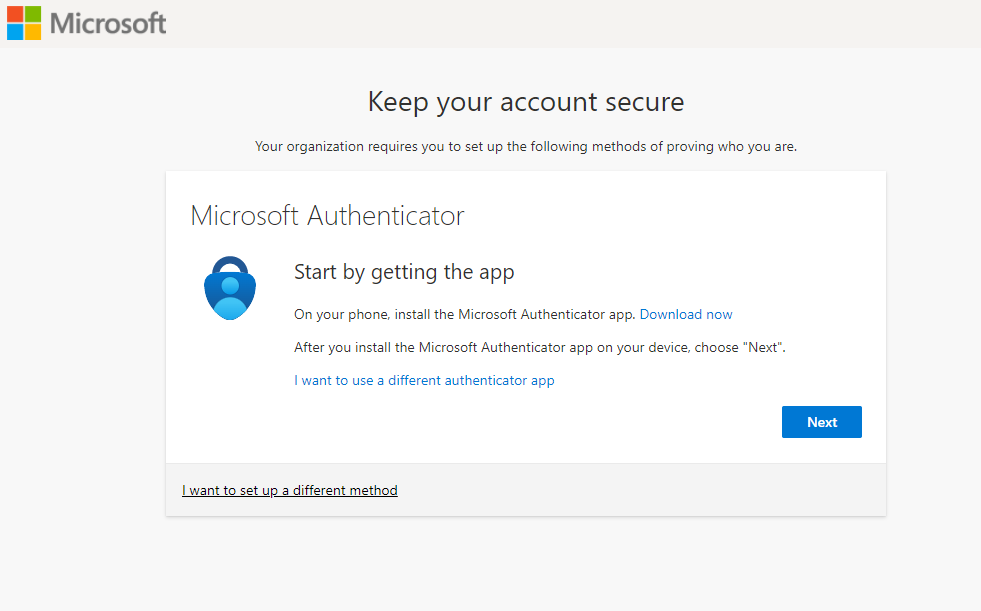
You will see this screen afterwards:
First get the app on your phone if your don't already have it. Find the app: "Microsoft Authenticator" at the Google Play Store or the App Store (for Apple devices) if you don't have it.
Click Next button on the computer
On your phone, open Microsoft Authenticator
Tap on the plus sign button to add an account
Select Work or School as the type
Press Next on your computer screen
Using the app on your phone, after selecting Work or School, choose the method: Scan QR Code
The camera will display on the phone, use it to scan the QR code displayed on the computer.
You will be asked to verify by entering the number on the computer into the app on the phone.
Then you will be asked to put in your phone number to create an additional backup method of multifactor authentication (receiving a code via text message)
Follow through and you will get a message confirming your success. This last part is important, be sure to log out of all Microsoft programs and email or better yet, restart your computer. Your new security is not being used to verify your previous log ins.